
How to Set Up Cashless Payments at Festivals (Complete Guide)
If you're an event organizer, school administrator, or festival planner responsible for managing payments at your event, you've likely faced the operational...
If you're an event organizer, school administrator, or festival planner responsible for managing payments at your event, you've likely faced the operational chaos that comes with handling cash. Long queues at food stalls because vendors can't make change fast enough. End-of-day reconciliation that involves bags of cash and handwritten receipts. No clear visibility into what sold where or which vendors are underperforming.
Whether you're organizing a 500-person school fair or a 50,000-attendee music festival, cashless payment systems eliminate these friction points. This guide walks you through what cashless payments are, how to implement them, what they cost, and which technology works best for different event types.
Curious how this works in practice? See how one institution transformed their annual fair with QR-based payments.
What Is a Cashless Payment System for Events?
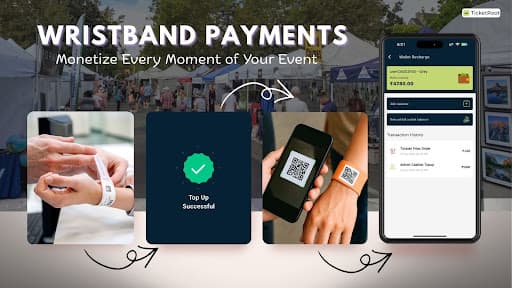
A cashless payment system replaces physical currency with digital transactions at events. Attendees load money into a digital wallet—linked to a wristband, mobile app, or QR code—and vendors deduct amounts by scanning or tapping. No cash changes hands. No manual reconciliation at day's end.
Modern cashless systems fall into three categories:
NFC-based systems use chip-enabled wristbands or cards that communicate with POS terminals via near-field communication. Common at large European festivals, but hardware costs run high—₹150-300 per wristband plus terminal rentals.
Mobile wallet apps require attendees to download event-specific applications. Works well for tech-savvy audiences but creates adoption friction for family events, school fairs, or rural gatherings.
QR-based systems use scannable codes printed on paper or fabric wristbands. Vendors process payments using their smartphones. No specialized hardware required. This approach offers the lowest barrier to entry for both organizers and vendors.
Which Cashless Method Works Best for Your Event Size?
For events under 10,000 attendees—school festivals, community fairs, brand activations, corporate gatherings—QR-based systems deliver the best cost-to-benefit ratio. Setup is faster, vendor training takes minutes instead of hours, and upfront infrastructure investment is minimal compared to NFC or traditional POS systems.
Want to dive deeper into the benefits? Here are 10 advantages of cashless payments at events that go beyond just convenience.
See It in Action!
From Wallet Setup to Real-Time Payouts: How It Actually Works
Here's the complete flow, from attendee arrival to vendor settlement:
Wallet Issuance
Each attendee gets a wristband with a QR code, linked to their ticket or mobile number at registration.
Top-Up Options
Attendees add money via SMS/email payment links before the event, or at on-ground help desks using UPI, card, or cash. No app download needed.
Instant Transactions
Vendors scan the QR code, amount deducts instantly, and syncs to dashboards in real time.
Live Reconciliation
Organizers track spend, top stalls, and inventory live. Settlement reports generate automatically at event end.
See how it works in action at this school fair using QR wristbands.
How to Set Up Cashless Payments for Your Event (Step-by-Step)
1. Map Your Cashless Zones
Identify which areas need digital payments—food courts, game stalls, merchandise booths. QR-based systems run on phones and wristbands, no complex hardware.
2. Auto-Link Wallets to Tickets
When attendees book through TicketRoot, wallets are created and linked instantly. They arrive ready to pay.
3. Onboard Vendors in Under 15 Minutes
Set up merchant logins with menus, pricing, and tax details. Vendors only need their phones—no rentals, no delays.
4. Configure Top-Up Channels
Preload wallets if needed, or let volunteers handle on-ground top-ups via the Admin App using UPI or cash.
5. Run a Pre-Event Test
Simulate the full flow 1-2 days before: issue test wallets, place sample orders, verify dashboards, confirm refund settings.
6. Deploy On-Ground Support
Station crew at key points for QR scans and top-ups. Distribute wristbands and set up live support desks for wallet queries.
Why QR-Based Payments Work Better Than Traditional Methods
Zero Hardware Investment
Vendors use their smartphones. No POS terminal rentals, no NFC wristband purchases, especially valuable for events in emerging markets where hardware logistics get complicated.
Train Anyone in Minutes
Scan QR, enter amount, done. No card swipes, PIN entries, or receipt printing to learn.
Scale Without Breaking Budget
No expensive wristbands or terminal rentals means lower setup costs and less wastage, even for large festivals. Many event organizers don't realize they're quietly losing money at the food court. A QR-based system helps plug those leaks.
One QR, Multiple Uses
Use the same code for check-ins, payments, and access control across digital (email/SMS) and physical (printed badges) touchpoints.
Real Events That Made the Switch
Cathedral School Christmas Carnival: 3,500 Students, Zero Cash Counters
Cathedral School in Mumbai used QR wristbands for 3,500+ students across food and game stalls at their annual Christmas Fair. Vendors scanned payments via smartphones—no POS terminals needed. Result: faster queues, real-time sales tracking, zero cash errors, and automated settlement. See how the institution managed their carnival using this system.
Saras Mela: 80,000+ Visitors Go QR-Based
India's Ministry of Rural Development took the Saras Mela cashless using QR wristbands for 80,000+ visitors. Rural vendors—many first-time digital users—processed payments via smartphones. Attendees topped up online or at counters. Outcome: faster transactions, eliminated currency risks, simplified payouts, and seamless operations across diverse vendor types. Watch how Saras Mela 2024 went cashless with 80,000+ visitors
Common Questions About Wristband-Based Payments
What if attendees don't use up their wallet balance?
Refund policies are set by the organiser. Some events process refund requests post-event, others offer donation options or make balances non-refundable. TicketRoot provides the tools—you decide the policy.
Can the system work without internet?
TicketRoot's solution works best with connectivity. If internet is limited, we help plan around coverage zones or recommend hybrid setups based on your event scale.
What about attendees who prefer cash?
Many organisers set up help desks where cash payments are converted to digital wallet credits by staff—covering both payment preferences.
Is the system secure and compliant?
Yes. TicketRoot uses industry-standard encryption and trusted gateways like Razorpay. Data policies align with your preferences and regional compliance requirements.
Want to See the Full Picture?
- Watch:QR-based payments at festivals and food courts
- Download: Complete cashless payments deck
- Explore: Monetization features for events
Ready to simplify payments and boost vendor returns at your event?
Let’s run through how TicketRoot’s cashless system can plug into your setup — from check-in to payouts.
No jargon, just a working walkthrough.
Running an event and need a secure, trusted platform? Talk to TicketRoot →