
Conference Registration, WhatsApp Passes & QR Check-In for 250 Attendees | EDEC 2026
At around 250–300 attendees, conference registration that runs on Google Forms, UPI payment links and WhatsApp stops working. Payments, passes, entry and follow-up sit in separate tools, and matching them by hand takes longer with every guest. The fix is one connected flow, from registration and payment to the QR pass, check-in and badge, so each guest has one record.
What changes at 250 guests?
Conference Registration, WhatsApp Passes & QR Check-In for 250 Attendees | EDEC 2026
At 250, two things happen at once: the admin outgrows one person, and arrivals bunch into the same half hour.
Every registration creates small tasks: a payment to match, a pass to send, a question to answer. At 50 guests, that's an evening's work. At 250, it fills several evenings, and errors creep in: a payment with no name, a guest who never got a pass.
Arrivals bunch because most guests come in the window before the first session. A printed list and one volunteer work when guests arrive a few at a time.
We call this the 250 threshold: the point where an event's admin becomes a job of its own. It isn't an exact number. A paid event with several categories can reach it at 150, and a free single-category meetup may not reach it until 400.
What breaks first when an event passes 250 guests?
Six jobs usually break, roughly in this order. The last column is the signal that a workaround has run its course.
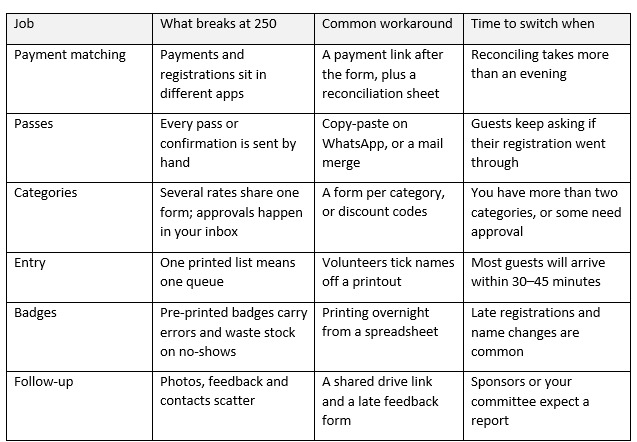
The jobs are linked: a payment that isn't matched becomes a pass that isn't sent, and then a guest who can't get in.
At EDEC 2026, passes went out automatically on WhatsApp and email (watch from 0:11).
Can you stretch Google Forms further?
Yes, for a while. Add-ons can patch some of its gaps.
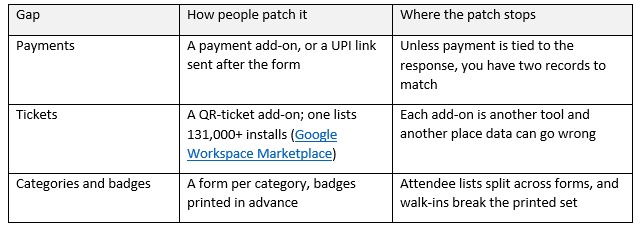
If your event is free, has one category and stays under about 150 guests, Forms plus one add-on is often enough. Past that, each patch is one more system to keep in sync.
How many check-in desks do you need for 250 guests?
It depends on how many guests arrive in your busiest window, and how long each check-in takes.
The formula: desks needed = guests arriving in the peak window ÷ (length of the peak window in seconds ÷ seconds per guest). Round up.
In this example, 150 of 250 guests arrive in the 30 minutes before the first session. Replace that with your own past arrival pattern. That's 1,800 seconds to clear 150 people.
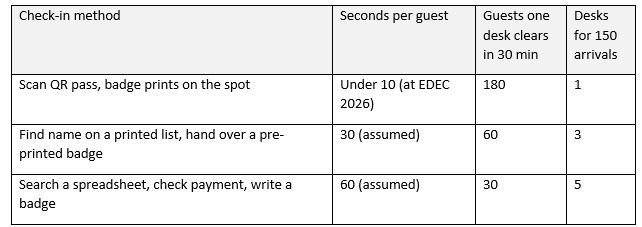
The EDEC 2026 arrival desk: one scan, and the badge prints in under 10 seconds (watch from 0:33).
Cutting check-in from 30 seconds to 10 turns three desks into one. Plan a backup desk for lost passes and late registrations, and time five volunteers checking in a friend each to get your own number.
What does a single registration flow look like? The EDEC 2026 example
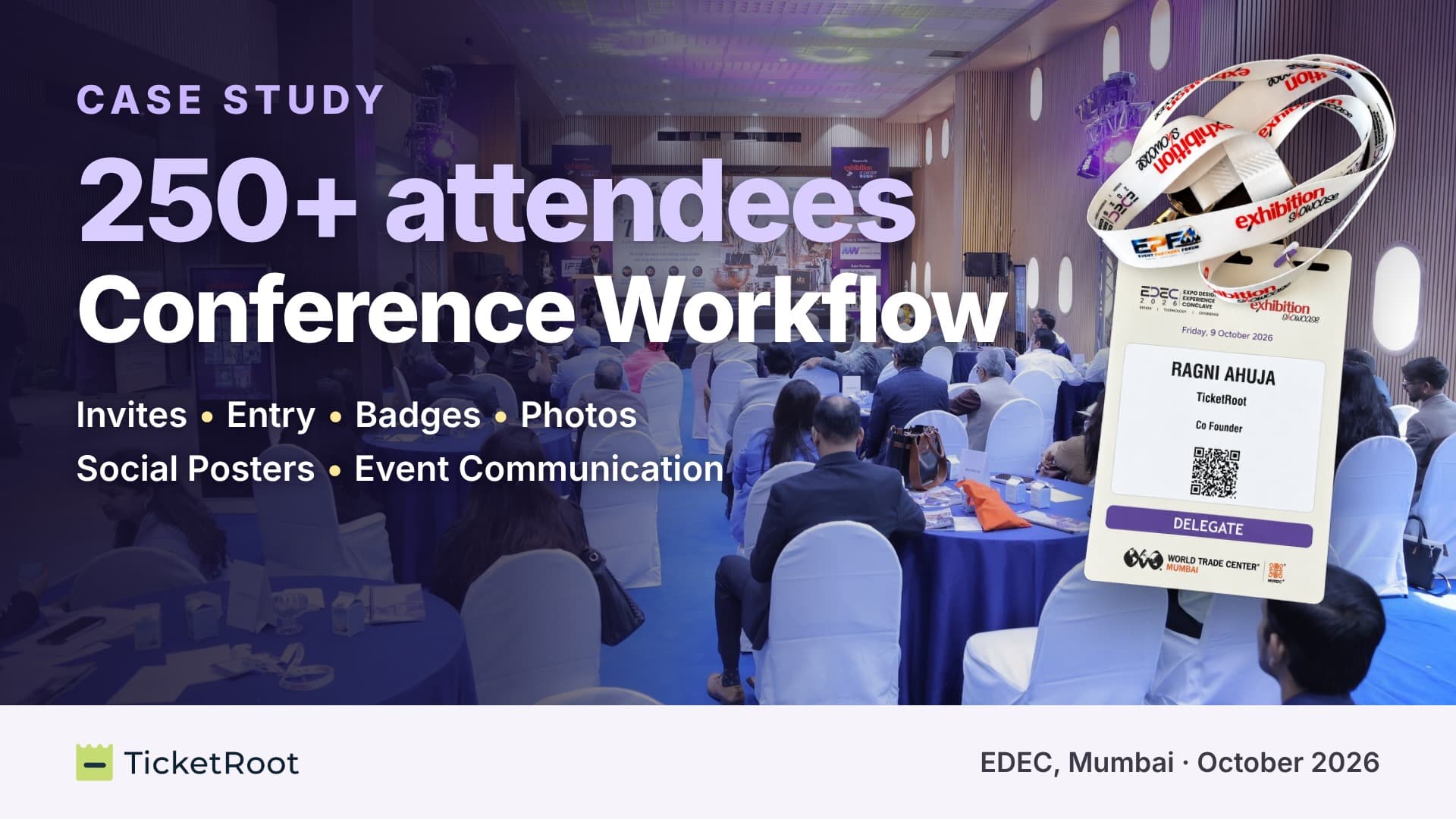
EDEC 2026, the Expo Design & Experience Conclave, brought 250+ attendees to World Trade Centre, Mumbai. Registration, passes, entry, networking and photos all ran on TicketRoot. Watch the full flow in the video at the top of this page.
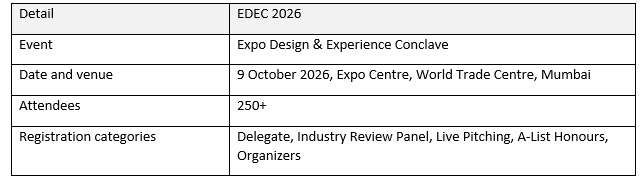
How each job was handled:
Categories (0:00). A branded registration website with a separate path for each of the five categories.
Passes (0:11). Approved guests got a QR pass automatically on WhatsApp and email, with the date, venue and entry gate.
Payments (0:11). Guests who weren't pre-approved got a pay-and-enter link on WhatsApp, so they paid and registered in one step.
Speakers and VIPs (0:21). Passes issued in bulk from the back end. Reminders followed, and guests shared "I'm attending" posters on LinkedIn.
Entry and badges (0:33). Staff scanned each pass, and the badge printed live in under 10 seconds.
Follow-up (0:45 and 0:55). Attendees scanned each other's badges to save contacts, then found their photos with a selfie, given with consent. The organiser tracked it all on one live dashboard (1:10).
Each guest had one record, so payments and passes were tied to them from the start.
How much does event registration cost in India in 2026?
Ask each vendor about every line below.
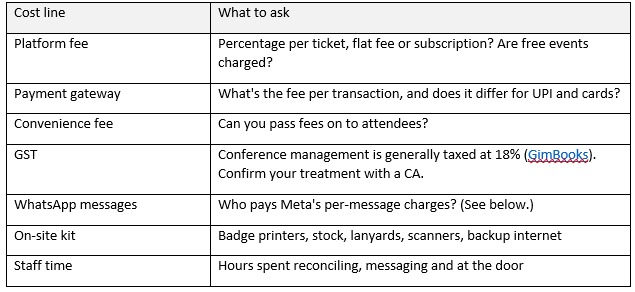
WhatsApp messages now cost money per message
Meta has charged per delivered message since 1 July 2025. Since 1 October 2026, utility messages sent inside an open 24-hour customer-service window are also charged, and since January 2026 Meta has billed eligible businesses in India in rupees (Meta).
To budget, multiply guests by messages per guest. A pass, two reminders and a photo link is four messages, so 250 guests means about 1,000. Rates change often, so check the current India rate on Meta's pricing page or with your WhatsApp provider.
What do India's DPDP Rules mean for attendee data and photos?
India notified the Digital Personal Data Protection (DPDP) Rules on 14 November 2025, with an 18-month window for phased compliance (PIB). Registration forms, guest lists and photos are personal data. Steps to take now:
Tell people what you collect and why, in a short, plain notice on the registration form itself.
Collect only what you'll use. Drop any field you won't need for the event.
Ask separately for photo matching. Finding a guest's photos from a selfie is a distinct use of their face, so it needs its own consent.
Set a retention period for attendee lists and photos, and delete them when it ends.
Check your platform. Ask how it stores, protects and deletes guest data. TicketRoot sets this out on its data and privacy page, and asks attendees for consent on screen before the selfie used to find their photos.
At EDEC 2026, attendees gave consent on screen before the selfie that found their photos.
This is general guidance, not legal advice. For your own obligations, speak to a lawyer familiar with the DPDP Act.
Is it time to switch? A 7-point self-check
If three or more are true for your next event, a connected registration platform will save more time than it takes to set up.
☐ You expect more than 200 guests.
☐ You have more than two registration categories, or some need approval.
☐ Payments and registrations live in different tools.
☐ You send passes or confirmations by hand.
☐ Most guests will arrive within the same 30–45 minutes.
☐ You need printed badges with names and categories.
☐ Sponsors or your committee expect a report after the event.
Frequently asked questions
What is the best alternative to Google Forms for conference registration?
A registration platform that keeps categories, approvals, payments, passes and check-in together. Each guest should have one record that holds their registration, payment and pass.
How do I collect payments and registrations together?
Make payment the final step of the registration form, so a registration is complete only once it's paid. For guests who need approval, send a payment link after approval that completes the same registration.
Can I send event passes on WhatsApp automatically?
Yes. Platforms connected to the WhatsApp Business API can send the QR pass when a registration is confirmed, then send reminders. Each message carries a Meta charge.
How many volunteers do I need at the registration desk?
Use the desk formula, then staff each desk with one person scanning and one handing over badges. Add a separate help desk for lost passes, walk-ins and payment questions.
How do I match UPI payments to registrations?
Take payment inside the registration form, so each payment arrives with the guest's details. If you use separate UPI links, ask guests to add their registration ID in the payment note, then match the two lists on that ID.
Can I limit the number of responses on a Google Form?
Google Forms has no built-in limit. Switch off "Accepting responses" by hand at capacity, or use an add-on that closes the form at a set number.
Do I need a badge printer at the venue, and which one?
If you have late registrations, walk-ins or name changes, yes: printing on arrival keeps every badge current. Choose a badge or label printer that works with your check-in app and badge size, test it with your actual stock, and keep a spare.
Running an event and need a secure, trusted platform? Talk to TicketRoot →